
How to Use Recycled Tech Devices as Learning Tools
The idea of dissection in the classroom is nothing new. Science teachers have been delighting (and occasionally sickening) students for decades by giving them hands-on experience with organisms and tools. What is new, however, is the movement to create un-making spaces in the classroom. Giving kids access to old, broken-down electronics and a safe place to take them apart as they seek to answer why and how things work is an effective and environmentally-friendly teaching technique.
Makerspaces and Un-Makerspaces
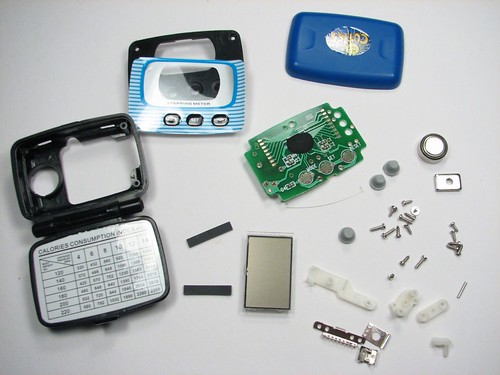
Image via Flickr by 1lenore
In a recent (excellent) Edutopia article, fifth-grade teacher Scott Bedley describes how he created an un-makerspace. He cites the recent maker movement and a trip to a Maker Faire as his inspiration: “A makerspace is a place for students to take raw materials and create ‘things’ using their imagination. The creativity required and the ‘in-time’ learning that a makerspace provides are powerful. I saw an example of the power of making this last school year when some of my students, who had normally struggled in a traditional class, created things such as a working catapult fashioned out of popsicle sticks, rubber-bands, and cardboard.”
However, Bedley also spoke with the makers at the Bay Area Maker Faire and realized that many of them took things apart when they were kids, as he did. He believes that we have an inner drive to create an understanding of the world around us, and that includes dissecting objects to ask and answer related questions. His un-makerspace gives students the opportunity to explore their own questions and answers, just as makerspaces give students a hands-on experience.
How to Create an Un-Makerspace
Bedley shares the seven basic steps that he took to create his un-makerspace.
- Find the Electronics: Bedley uses everything from old stereos, to discarded computers, to unwanted VHS machines. (We offer some tips for finding the electronics later.)
2. Tools of Un-Making: Request tools from families and community members. Contact your local hardware store or mechanic shops, and see if they would be willing to donate tools such as screwdrivers, wire cutters, pliers, wrenches, and hammers to help your school.
3. Safety, Safety, Safety: Take the time to discuss safety and the dangers of using tools as well as the benefits of using them. Make sure that students have the right safety equipment, including goggles and gloves, and set clear rules and procedures for the un-making space.
4. Organize Un-Maker Teams: Teach teamwork by having students collaborate on the project. Bedley uses a simple document to guide groups, so they know his expectations while having enough independence to explore and learn on their own.
5. Logging and Blogging: Give students the tools they need to log their dissections through writing, taking photos, and recording as they learn the science behind un-making. Blogging about the process gives students a chance to reflect on their process and learning to realize what they are thinking – and it’s great writing practice, too.
6. Extend the Learning: Make connections between un-making and math, writing, critical thinking, building fine motor skills, and developing executive functioning skills. Create a safe environment for students to use their own questions to drive their engagement and motivation.
7. Clean-Up:It’s important to have the necessary gear for cleaning up. Tarps and butcher paper are helpful for covering the floor before students begin working. Find a recycling location that accepts electronics, and deliver the electronics after your students have finished un-making.
How to Find Unwanted Electronics
One of the best ways to find unwanted electronics and get them into your classroom is to inform parents of your un-makerspace and request donations. The students will be familiar with the items that they dissect, and you will be involving parents in your new teaching technique from the beginning. Visiting yard sales and thrift shops are two of the less expensive ways to acquire the electronics, too. You also should contact the local newspaper and radio stations to advertise for you. If you have a school or classroom website, post the request online. You’ll be surprised how many people will donate to your un-makerspace.
Incorporating Un-Making Into Your Lesson Plans
The most obvious way to work un-makerspaces into classrooms is for science teachers to incorporate science and technology concepts into their lesson plans on un-making project days. Students investigate the valuable metals found in electronics such as gold, silver, copper, and rare earth metals. Science teachers also facilitate the process of students investigating other materials in the electronics, including other metals, plastics, circuit boards, glass, and cables. Also, Earth Day, recycling, and environmental concepts lend themselves very easily to un-makerspace projects. Teachers have the added bonus of modeling the positive environmental impact of using recycled materials in their classroom and then sending the remaining items to appropriate recycling centers.
Teachers also often look for a way to do cross-curricular activities, and creating un-makerspaces is one surefire way to do just that. Un-makerspaces encourage students to use critical thinking skills as well as science and technology skills and knowledge. Science and English teachers easily turn un-makerspaces into cross-curricular learning activities for students. Science teachers can focus on the science aspects of the project, including engineering and electrical concepts, while English teachers can focus on the explanation, description, and reflection that takes place as students log and blog their learning experiences.
As students complete the un-making process, English teachers can use an analogy for analyzing content: Students break one item into its pieces as they often do when they read a complex text. Then, as students rebuild or create a new item from the pieces, English teachers can further extend this an analogy to contextualize synthesizing and drawing conclusions.
Wrapping It Up
Districts that encourage student-centered learning embrace teachers who create un-maker spaces. Students put their knowledge to use while teachers play the role of facilitator or coach in the un-making space. As an extended learning opportunity, students rebuild or use the parts from the un-makerspace to create something new, making the entire process a student-centered learning opportunity.
During a time when public school teachers seek ways to foster creativity in their students, using recycled technology devices as learning tools and creating un-makerspaces is a solution that fits multiple subject areas and addresses several layers of Bloom’s Taxonomy. Giving students the opportunity to explore and learn on their own enhances critical thinking and engages students, so start gathering those unwanted electronics and prepare your un-makerspace soon.

